



For me, booking flights is the most stressful, and least fun, part of travel. I’m spending a lot of money, and there are so many places to make mistakes. Did I choose the right dates? The right airports? The right number of passengers? Is there a typo in my name?
I can cut back that stress, at least a little bit, by taking some steps to make sure I’m getting a good price on my flights.
Here’s exactly how I use Google flights to find cheaper fares.
For all our tips, recommendations, and itineraries, grab a copy of Eternal Spring: Our Guide to Mexico City. It’s optimized for your phone, with links to everything you need for your trip.
📍1. I choose multiple departure and arrival airports
Step one on Google Flights is entering where you’re flying from, and where you’re going. If you have any flexibility on either end, select multiple airports so you can compare.
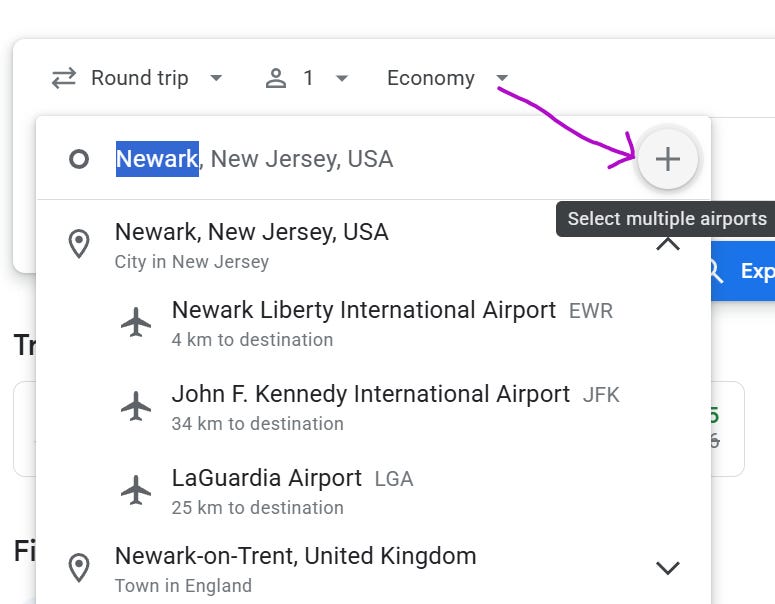
From our home in Pennsylvania, Newark and Philadelphia are usually the best options, but sometimes we find good fares from our smaller local airport in Allentown.
The same goes for the destination. We fly to Mexico City a lot, which has two airports, though so far, the main airport has always been the best option for us.
This strategy is especially popular with travelers going to Europe or Asia from the U.S. The theory is that you get across the ocean as cheaply as possible, and then use a lower-cost regional flight, train, or bus to get to your final destination.
💵2. I start out with economy fares
Choosing to filter by Economy fares is kind of annoying, because basic economy flights are too restrictive. I know I’m going to upgrade at least a little, so I’m not going to see the prices I’ll really pay.
But, Economy shows all the flight options. If you search for premium economy, business, or first-class flights, options you might consider can get filtered out.
For example, our “flights” out of Allentown can include a bus ride to Newark as the first leg. Those bus rides only include economy seats, so if we add filters for Premium Economy or Business, we won’t see trips that start in Allentown at all.
🛑3. I set the minimums I’ll accept
Once I’ve chosen my airports, dates, travel class, number of people traveling, and whether I want round trip, one way, or multi-city flights, Google Flights shows me my options.
This is when I filter out whatever isn’t worth the savings to me, like more than one stop, or hours-long layovers, or red-eyes.
There’s no point in finding a super-cheap flight if it takes 17 hours to get there and a nonstop flight gets you there in 5 hours for $50 less. That $50 buys you hours in your destination, plus a lot less fatigue.
I don’t usually filter for things like the time of day I want to fly, certain airlines, or the total price I’m willing to pay, but those are options.
💲4. I look at the Price graph
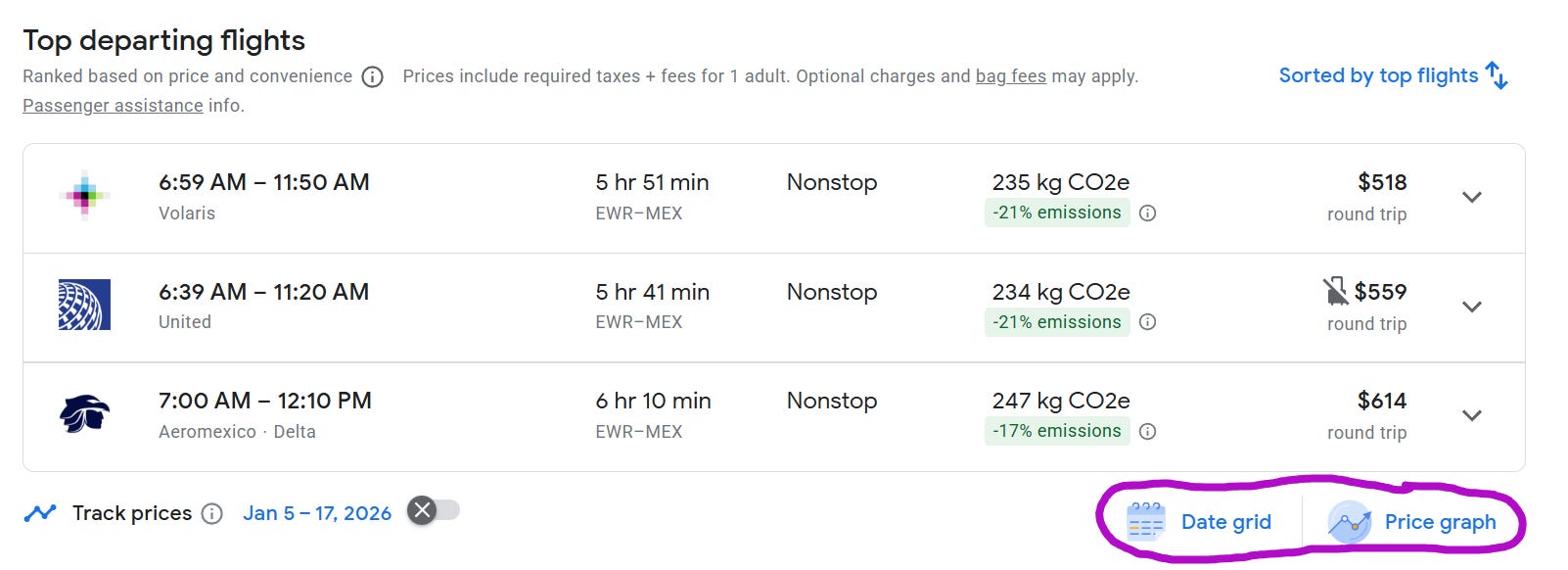
Underneath the section for Top departing flights, there are options for a Date grid and a Price graph.
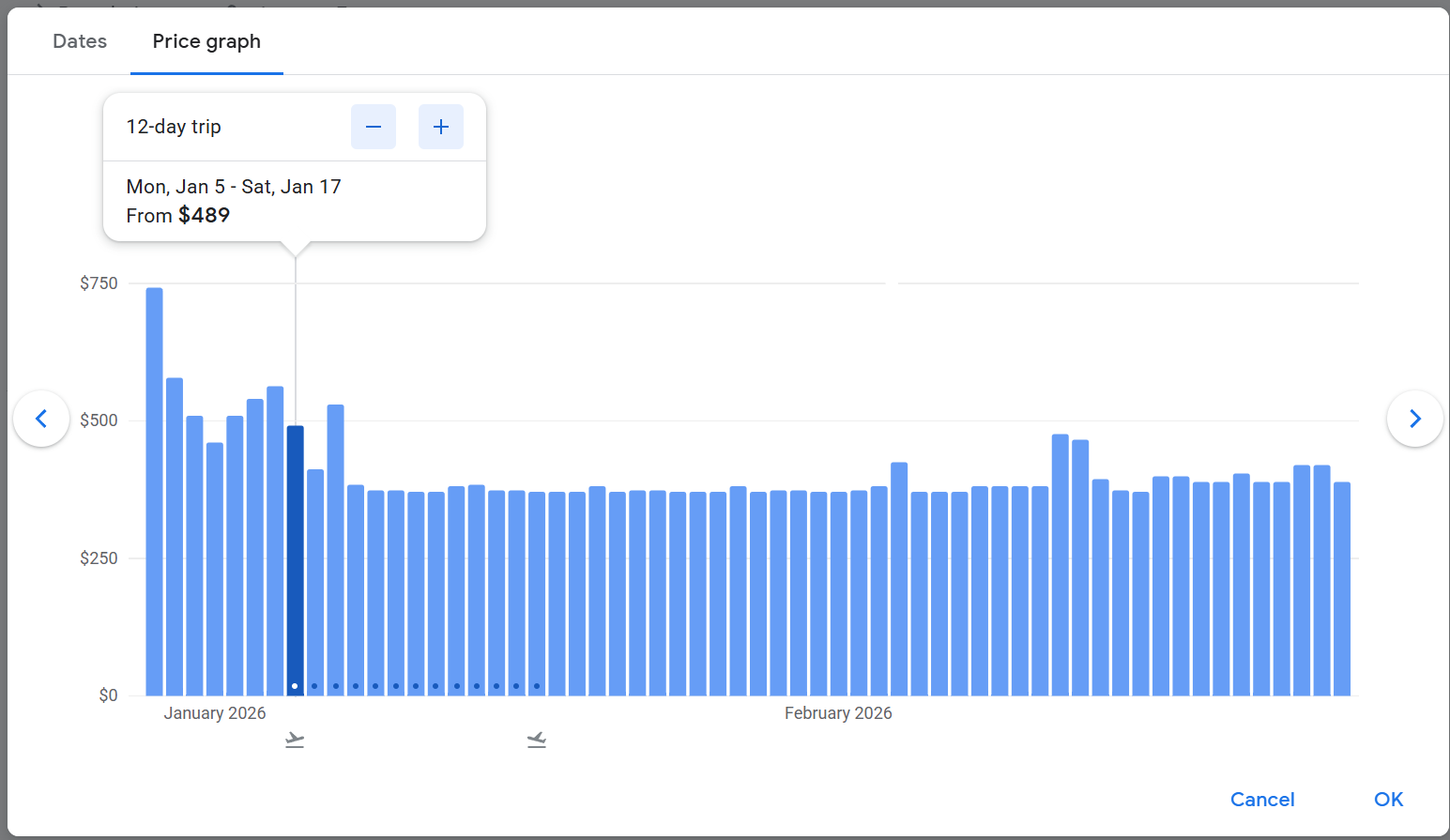
I usually have some flexibility in my travel plans, so this is where I go to find the best fares. I start with the price graph. Here, I see that leaving on Jan 5 costs $489.
But leaving a day later is cheaper—it costs $410. And then price level out between $369 and $383 through much of January and early February.
These prices show up as you mouse over different dates. You can also change the length of your trip here, but for that I look at the Date graph instead.
📅5. I look at the Date graph
The date graph shoes a week’s worth of departure and arrival dates. Here, I see that returning just one day later, Jan 20 compared to Jan 19, can save $162. I can also see that the cheapest flights leave on Sunday, so I can think about adjusting my schedule so I leave then.
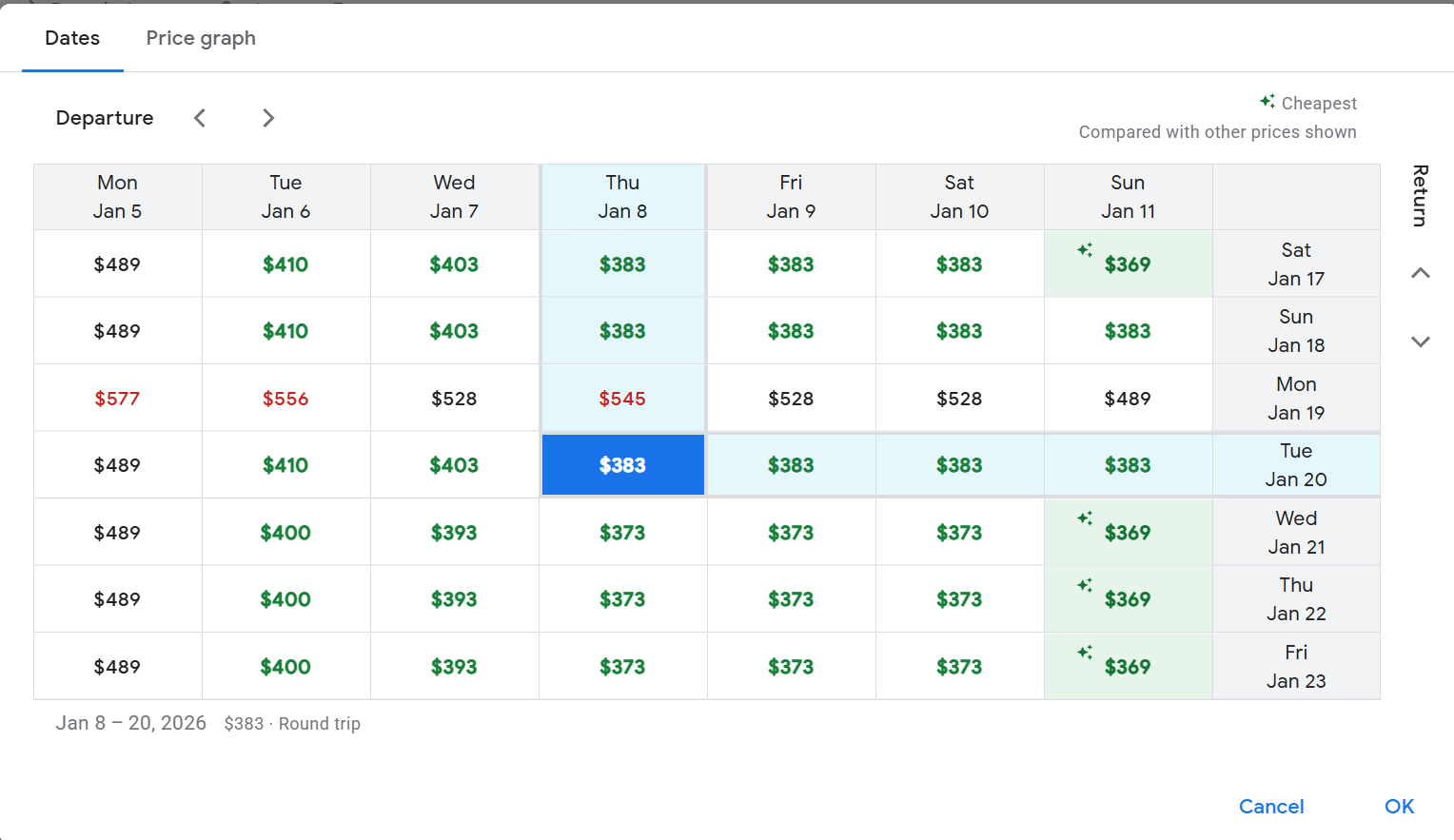
Scrolling earlier and later adjusts the date graph to different departure and return dates.
If you don’t have too much flexibility in your travel dates, you can skip the Price Graph and go straight to the Date graph.
☑️6. Choosing my flights
At this point, I compare your options. I might be willing to pay a little more for a nonstop flight, or an early morning flight that gives me more time at my destination, or an airline I typically fly.
Choosing the departure and return shows the buying options.
This is where I find out how little is included in my basic economy fare, and I’ll usually switch to regular economy. At that level, many airlines let you change your flight without a fee. (You may have to pay a price difference if the fare has gone up.)
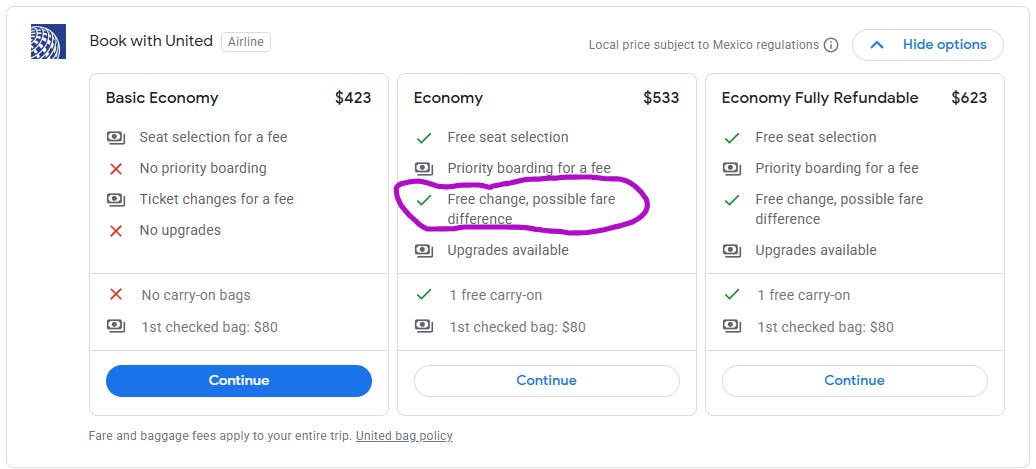
But, you might also get a credit if the fare goes down. That leads me to my top tip: If you know you want to take the trip, book the flights. Then, check the fares every week or so, or set an alert. If the price goes down, you can rebook. If it doesn’t, you got the best possible price.
❓Should you book with the airline?
You can compare your prices with the prices you find on Expedia, Kayak, and other flight sale sites. Sometimes, Google Flights will show you these prices, and sometimes you have to go to the sites directly.
Personally, I always buy with the airline, mainly because the only time I find cheaper fares with these sites it’s when it’s a site I’ve never heard of, and I don’t trust it.
If my flight gets delayed or canceled, I feel like I’ll have better luck dealing with the airline directly than with a third party.
💺Seats and upgrades
If you’re considering upgrading to an extra legroom or exit row seat, you’re going to want to do some comparisons.
On my sample flight, my $533 flight goes up to $825 with extra legroom. If I’m going to pay that much extra, I’ll take a look at business class fares. They might be around the same price.
💡Quick tips
If you’re booking a trip from outside your home country, scroll to the bottom of the page if you want to change your location or currency. (I’ve heard you can save money by choosing another currency, like Mexican pesos instead of US dollars. I’d love to hear if this works for you.)
If you like to travel, and you’re open to different dates and/or destinations, enter your departure airport(s) on the first screen and leave the dates and destination fields empty. These options are ranked mainly by popularity, factoring in cost and convenience. So they aren’t necessarily the best deals, but they give you an idea of what it will cost to fly to different places.

On the first screen with Google Flights, you can choose from round-trip, one-way, or multi-city flights. Multi-city keeps you from backtracking to make your flight home. For example, next year I’m planning to take a cruise that goes from Barcelona to Rome. So, I can use the multi-city option to fly into Barcelona, then home from Rome.
Practical Globetrotters shares this advice: “I use FlightConnections to look at which cities have direct flights into a specific location. And then I use Google Flights for all the various options that could save us money. Sometimes, I find a route that I would never have considered on FlightConnections.”
🤖What about finding flights with AI?
I’ve seen some success stories where people put all their parameters into AI and it comes up with the best flights at a good price. I’ve only tried it a couple of times myself, and I haven’t had much luck so far. I’m sure it will get there.
Rich Shipley shared a simpler way to start with AI: “I just ask ChatGPT or regular Google something like ‘what airlines fly non-stop from SFO to LIS‘ or ‘what are the cheapest flights from X to X in mid-January.”
🖋️Should you buy travel insurance?
I don’t, but travel insurance for flights, since these days, with most regular economy or better flights (not basic economy), you can change your flight without a change fee. As long as you’re going to fly on that airline within a year or so, you shouldn’t lose the value of the ticket.
If I were going to buy travel insurance, I would buy it from a travel insurance company to cover my whole trip, not from the airline, despite how alarming they make it seem when you turn down the travel insurance option.
🗨️What are your tips for finding good airfares? Let me know in the comments!
Great info, I’ve never used Google flights but will give it a try now!
Thanks, Love the Data 📊 advice I had no clue that was even an option. 😊